MCP Token Cost: Where the Tokens Actually Go
Trimming descriptions is the standard advice for MCP definition bloat. We split five real servers open, tool by tool, and the description is the biggest chunk on none of them. The cost lives in input schemas — and on the fattest server of all, in pictures.
A reader measured real hosted tools and found the heaviest definition was almost all an output schema — nothing the author wrote. Our earlier run never split the output schema out from the description and the input schema, so we could not say whether he was right, or how far it went. So we split five real server definitions open: the filesystem, memory, sequential-thinking, everything, and GitHub servers, 68 tools in total, counted the same way as the earlier runs so the totals reproduce exactly.
The answer is messier than either of us expected. He is right that the cost is not in the descriptions. He is wrong about where it is. And the split turned up something neither of us was looking for, hiding in the heaviest server of all.
The split: descriptions are 11.2%
Across all 68 tools, 23,298 tokens of definition: descriptions are 2,619 tokens, 11.2 percent. Input schemas are 6,876, 29.5 percent. Output schemas are 2,205, 9.5 percent. The description is not the largest part anywhere.
| Server | Input schema | Description | Output schema |
|---|---|---|---|
| Filesystem | 39.4% | 26.1% | 18.1% |
| Sequential-thinking | 43.8% | 33.8% | — |
| GitHub (26 tools) | 84.4% | 8.0% | none |
| Memory | 36.4% | 14.2% | 37.3% |
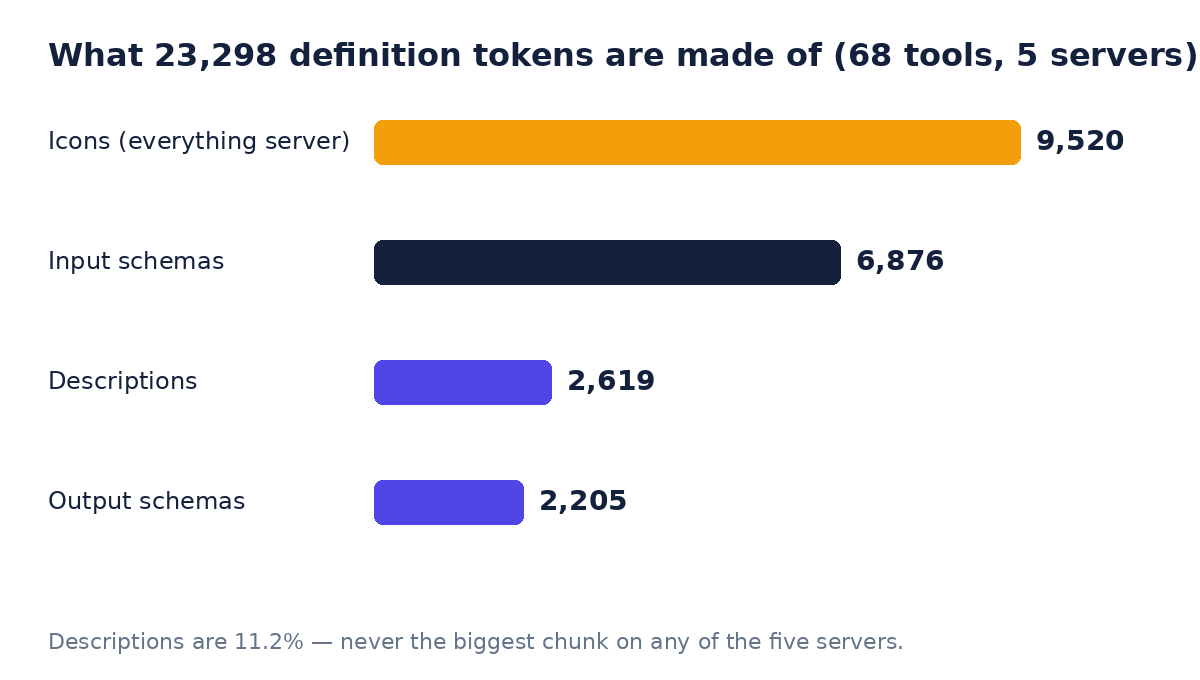
So the advice to trim descriptions is trimming the third-biggest bucket at best. It is not useless. 11 percent is 11 percent, and over forty turns it compounds. But it is not where the cost lives, and anyone selling description-trimming as the fix for definition bloat is selling a haircut for a weight problem.
The output schema wins on exactly one server, by 27 tokens
The memory server is the one place the output-schema shape shows up. Its output schema
is 37.3 percent, edging out its input schema at 36.4 percent, and the description is a
distant third at 14.2. Stripping every description there saves 453 tokens while the
output schema alone costs 1,186, two and a half times more. The three read tools —
read_graph, search_nodes and open_nodes — each
carry the fattest output schema in the whole set at 238 tokens: the full entity and
relation shape, with per-field descriptions.
But here is the detail that changes the story. We checked the shipped server source
instead of guessing, and every output schema in this set is author-written. The memory
server's schemas are objects written in the server's own code, reusing the same entity
shape as the input schema. The filesystem server's output schema is a generic wrapper
the author wrote once — {content: string}, the identical 40-token schema on
fifteen of its sixteen tools, because the server returns every result as one text blob.
None of them was generated from past runs. None of them describes anything the tool
actually returns in particular. The filesystem one does not even try: it is a wrapper
that says "the result is text", forty tokens, fifteen times over.
The heaviest server is fat with pictures
The surprise came from the heaviest server in the set. The everything test
server totals 11,914 tokens across 16 tools, and 9,520 of those, 79.9 percent, are
icons. Every one of its tools carries two base64-encoded SVG icons, light and dark, 595
tokens each. The single heaviest tool in the whole set, get-header-params at
898 tokens, is 595 tokens of icons, 108 of input schema, 91 of output schema, and 58 of
description. Our earlier run called that tool fat on schema richness. The split shows it
is mostly pictures.
Strip the icons and the whole test server falls to 2,394 tokens — cheaper than the
filesystem server. Whether a host even sends icons to the model is host-dependent, but
they are in the listed definition, so they are in the count. And
everything is a test server, so its numbers are real but not
representative. It is included because it proves the point the other four servers only
suggest: schema and icon richness dominates tool count. A server with 16 tools can cost
more than a server with 26, because the cost was never about how many tools there are.
It is about what each definition carries.
Presence is an author choice, not a protocol fact
Step back and the pattern across all five servers is simple. 28 of 68 tools have an output schema. GitHub has none. The filesystem server's is a 40-token boilerplate repeated fifteen times. The memory server's is a hand-shaped entity graph. Any claim of the form "output schemas cost X percent" needs the server named alongside it, because the answer is 37 percent on one server, 18 on another, 1.4 on a third, and zero on a fourth. There is no general number. There is only the server in front of you, split open.
That is the rule we keep. Split the definition before you trim anything, because the biggest chunk is different on every server, and on most of them it is the input schema, and on one of them it is pictures. The description is never the biggest chunk. Trim it if you like. 11 percent is real money over forty turns. But trim it knowing it is the third thing on the list, not the first.
The honest limit: these are local servers, not hosted ones. A hosted server that synthesises output schemas from past runs would show a much larger output-schema share than anything here. This run neither confirms nor refutes that shape. It says what the five real official servers actually carry — and what they carry is input schemas, author-written output schemas, and, on the fattest one, pictures. For the per-server totals this split builds on, see how much an MCP server costs in tokens, and for the bigger bill — the results that come back during a task — see trimming tool results.