What Is an ATS Resume? (And How to Make One)
Most applications are read by software before they reach a person. An ATS resume is simply a resume built to survive that first read: plain structure, standard headings, and words taken from the job ad itself.
What an ATS actually is
ATS stands for applicant tracking system. It is the software a company uses to collect applications, store them, and search them. When you apply through a company site or a job board, your resume usually lands in an ATS first, not in an inbox. A recruiter then searches that database the way you search email: by job title, by skill, by years of experience. If your resume cannot be read and filed correctly, it does not matter how strong it is. It simply never comes up in the search.
An ATS resume is not a special kind of writing. It is an ordinary resume formatted so the software can parse it into the right fields: your name, your job titles, your employers, your dates, your skills. The person still matters. The software just reads first.
How the software reads your file
Parsing works roughly like this. The system pulls the text out of your file in reading order, then looks for landmarks: headings it recognises, date patterns, company and title lines. It files what it finds into boxes. Anything it cannot place gets dropped or dumped into the wrong box. That is where most pretty templates fail:
- Two columns. Many parsers read straight across the page, mixing your sidebar skills into the middle of your job descriptions.
- Skill bars, stars and icons. A bar chart showing "90% Excel" is a picture. The parser sees no text, so the skill is recorded as nothing.
- Text boxes and tables. Content inside them is often read out of order, or skipped.
- Headers and footers. Contact details placed in the page header or footer are dropped by several systems.
- Creative headings. "My journey so far" is charming and unrecognisable. The parser is looking for the word Experience.
The formatting rules that keep you readable
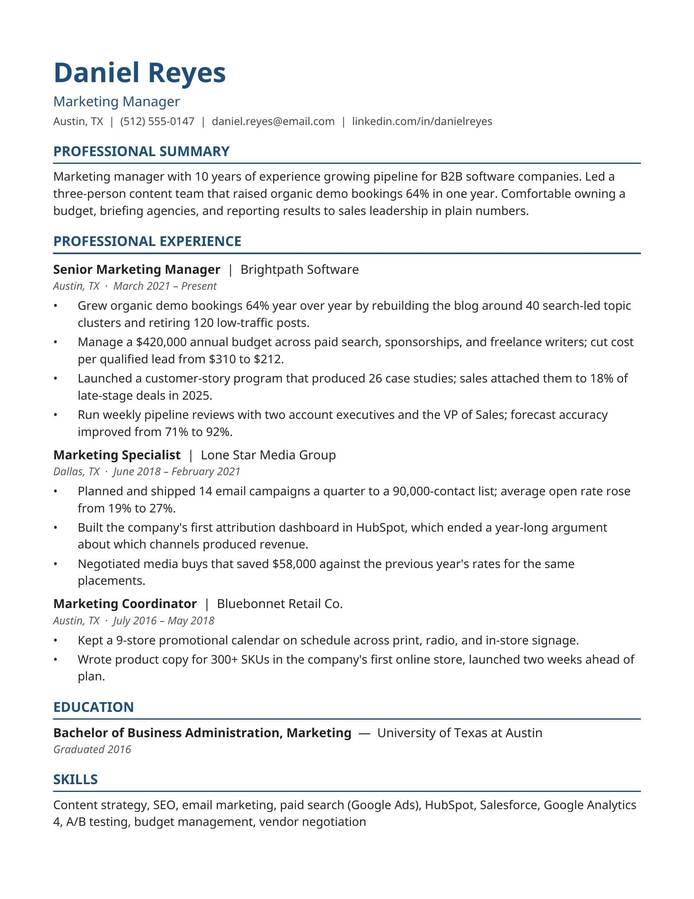
- One column, top to bottom. The oldest layout is the safest one.
- Standard section headings. Summary, Experience, Education, Skills. Boring words, correctly filed.
- Real text for every skill. If a skill matters, it appears as words, not as a graphic.
- Simple bullets, no tables. Short lines that start with a verb and end with a result.
- Consistent dates. Pick one format, like Jan 2023 – Present, and keep it everywhere.
- Contact details in the body. Name, email, phone and city at the top of the page itself.
- A plain file name. Your name and the word Resume, so a human filing it later can find it too.
DOCX or PDF?
Follow the job ad. If it asks for a format, send that format. When nothing is specified, DOCX is the safer default: Word files are the format these systems were built around, and every parser handles them. A PDF made from a simple single-column document is usually fine too. A PDF exported from a heavily designed template is where the scrambling usually starts, because the text order inside the file follows the design, not the reading.
Keywords, without lying
Because recruiters search the database, the words in your resume decide whether you appear. The honest way to handle this is to read the job ad and notice its exact terms: if the ad says "inventory management" and your old job called the same work "stock control", use the ad's words for the work you genuinely did. Mirror the language, never the claims. Adding skills you do not have survives the software and dies in the interview, which is a worse place to fail.
A 15-minute ATS pass on your current resume
- Open the file and select all the text, then paste it into a plain text editor. Read the paste. That jumbled version is close to what the parser sees; if your experience reads in order there, you are most of the way safe.
- Check the headings are the standard words, and rename any that are not.
- Move anything trapped in a header, footer, text box or table into the main body.
- Turn every graphic rating into a sentence: not a 90% bar, but "Excel: pivot tables, lookups, monthly reporting".
- Re-read the job ad, and make sure the skills you truly have are written in its words.